Best Photo Digitization Companies in 2026: Pricing, Mail-In Process, and What to Look For

Bill Rebozo
Best Photo Digitization Companies in 2026: Pricing, Mail-In Process, and What to Look For
11:11
Updated September 2026
Somewhere in your house there's a box — maybe a closet's worth — of prints, slides, and tapes that nobody has looked at in years. You're not alone: at the height of film, American photofinishers were producing more than 30 billion prints a year, and most of those prints are still sitting in drawers. If you'd rather not scan them yourself, a mail-in digitization service will do it for you. The good ones make shipping easy, keep track of every original, scan at a consistent quality, and send your files back along with the box. This guide walks through how the process works, what it costs in 2026, how the major companies compare, and which one we'd trust with the box that matters most.
How does mail-in photo digitization work?
Nearly every company follows the same five steps:
- You pick a package or ask for a quote. Some charge per photo or per tape. Some sell kits where an "item" is one tape, one film reel, or a set of 25 photos. Some sell a box: fill it, and the price is the price.
- They send a kit, or you ship your own box. Most include a prepaid label and packing materials.
- You pack and ship the originals. Group them by event or year, keep them in order, and tuck in a one-page inventory. (Checklist below.)
- They scan and deliver the files. Usually a download portal, often with a USB drive as an add-on.
- They return the originals. Turnaround runs from about two weeks to six or more, depending on volume and the season — the weeks before the holidays are the slowest.
The premium services add a step at the front: someone sits down with you (or comes to your house) and sorts the collection before anything is scanned. That step turns out to matter more than the scanner.
What does photo digitization cost in 2026?
Prices below are the companies' own published figures as of September 2026. Two things to know before comparing: almost every mail-in service runs a permanent-looking "limited time" discount of 40–50% (so list prices are rarely what you pay), and the cheapest per-photo rate is usually reached only when you fill a prepaid box.
Per-photo scanning
The bulk services cluster between 25¢ and 50¢ per print at 300–600 dpi: Southtree lists 25¢, Larsen Digital 30¢ (300 dpi) or 50¢ (600 dpi), ScanCafe 48¢, iMemories 49¢ with its standing promo code. Premium handling costs more: EverPresent charges 98¢ for the first 200 scans and 68¢ after that, plus a $50 order fee.
Prepaid boxes
Fill a box and the per-photo price drops hard. ScanMyPhotos' box holds around 1,800 photos for $400 at 300 dpi or $445 at 600 dpi — roughly 22–25¢ a print if you fill it. ScanCafe's Value Kits (prepaid for 500 to 10,000 images) start at 34¢.
Kits and "items"
Legacybox and FOREVER sell by item, where an item is one tape, one reel, or 25 photos. Legacybox runs from $69.98 for two items to $1,249.98 for forty. FOREVER's 10-item box is $150 on promo ($300 list) and works as a credit — send more and they quote the difference before scanning.
Tapes and film
Videotapes run $15–$20 each at list (Southtree $15, Larsen $15, Capture and iMemories $19.99 and $14.99 with their codes). Film is priced per reel ($19.99 at Capture, $25 at Southtree) or per foot (25–30¢ at Larsen). Slides and negatives cost about the same as prints at the budget end and more when scanned at 4,000 dpi or with multiple exposures.
Full-service projects
The concierge services — where a team organizes, scans, restores, and builds something from the result — are quoted per project. Your Legacy Your Story publishes its mail-in kits from $199 to $1,950 and quotes larger and in-home work individually. Expect the total to be a multiple of a bulk order, for reasons we'll get to.
What should you look for in a photo digitization company?
Scan quality
Resolution. 300 dpi is fine for viewing on a screen; 600 dpi lets you reprint or crop. Slides and negatives need 2,000–4,000 dpi to look like anything. Color and dust. Ask whether correction is automatic, hand-done, or a paid add-on. File format. JPEG is the default everywhere; ask for TIFF if you want an archival master.
How they handle your originals
Barcoded tracking and status updates, a stated policy for lost or damaged media, and an answer to "do you keep my photos in the order I sent them?" Most bulk services scan in order; few will re-sort for you.
Organization and delivery
Files delivered in sensibly named folders beat one giant dump. Check the download window — some portals expire — and what a USB drive or "extended cloud" costs on top.
Cost transparency
Minimum orders, return shipping, drive fees, "safe-ship" kits, and cleanup charges all live in the fine print. Two services with the same headline price can land $60 apart.
Who's behind it
This one gets skipped and shouldn't be. Your originals leave your house. You want a company with a track record, a real address, named people, and reviews you can read — and one that will still be around when you want a reprint or a second copy of the archive. An A+ rating from the Better Business Bureau, years in the trade, and a founder whose name is on the door are worth more than a cheaper per-scan price.
Is there really a difference between cheap and premium scanning?
Yes, and it isn't mainly the scanner. Mail-in digitization is really two different jobs sold under one name.
Job one: bulk scanning. You pack the box, a machine feeds the prints, and files come back. For a few thousand ordinary snapshots this is exactly right, and the budget services do it well for a quarter a print.
Job two: archiving and storytelling. Someone sorts the collection with you, identifies what's what, scans the fragile pieces by hand at archival resolution, restores the faded ones, and then does something with the result — a book, a film, a family history with the photos in it. That is craft work, and it is priced like it.
The mistake is using price-per-scan to choose for job two. The box of drugstore doubles from 1994 and the shoebox of your grandmother's pre-war prints are not the same box, and they shouldn't get the same treatment. Spend the quarter-a-print budget on the first. Spend real money, once, on the second — and pick the people to do it the way you'd pick a surgeon: by reputation, not by coupon.
How do the photo digitization companies compare?
Published pricing as of September 2026. Where a company runs a standing promo code, we show the code price and note it.
| Company | Best for | Photos | Tapes | Film | Notes |
|---|---|---|---|---|---|
| ScanCafe | Mixed prints, slides, and negatives in volume | 48¢ à la carte; Value Kits from 34¢ (prepaid 500–10,000) | Varies | Varies | Bulk kits reward big orders; overage billed at the kit rate |
| iMemories | Mixed media plus streaming to phone and TV | 49¢ with code (99¢ list) | $14.99 with code ($29.99 list) | $14.99 per 50 ft with code | Optional cloud $7.99/mo or $49.99/yr; enhancement add-ons; owned by Ancestry since July 2025 |
| ScanMyPhotos | Thousands of loose prints on a budget | Prepaid box (~1,800 photos) $400 at 300 dpi / $445 at 600 dpi; small orders from $65 per 250 | Limited | Limited | Cheapest effective rate if you fill the box; clear dpi tiers |
| Legacybox | Simple mix-and-match kits | Sold as items (25 photos = 1 item) | 1 tape = 1 item | 1 reel = 1 item | Starter $69.98 (2 items) to Trunk $1,249.98 (40); return shipping and digital access included |
| Southtree | Straightforward menu pricing | 25¢ list | $15 list | $25 list | A 50%-off code is usually running |
| EverPresent | Albums, scrapbooks, and fragile prints | 98¢ first 200, then 68¢; +45¢ album handling; delicate items $1.99 | Quote | Quote | $50 order fee; careful handling and order preservation are the point |
| Capture | Drop-off instead of mail | From 29¢ | From $19.99 | From $19.99 per reel | Slides from 49¢; drop-off through Walmart, Sam's Club, Costco, and Walgreens |
| FOREVER | Box credit that feeds FOREVER's own storage service | By item (25 photos = 1) | By item | By item | 10-item box $150 on promo ($300 list); they quote overages before scanning; return the box within 12 months |
| Larsen Digital | Slides, negatives, and film | 30¢ (300 dpi) / 50¢ (600 dpi) | $15 | 25–30¢ per ft | Slides 40¢–80¢ at 4,000 dpi; $20 minimum; detailed per-format menu |
| Your Legacy Your Story | The collection you want organized, restored, and turned into a book | Kits $199–$1,950; projects quoted | Quoted | Quoted (frame-by-frame 2K/4K) | In-home organizing and pickup; photos to 9,600 dpi, slides in 3-exposure HDR; restoration; book design and family films; BBB A+ |
Not in the table: long-term storage products like Permanent.org and pCloud. They don't scan anything — storage and scanning are different jobs, and we cover the storage half below.
Which photo digitization service is best for your situation?
- Thousands of ordinary prints, tight budget: a prepaid box from ScanMyPhotos, or a ScanCafe Value Kit. Fill it completely — that's where the price is.
- A closet of tapes and reels with some photos mixed in: Legacybox or Southtree kits keep the logistics simple; Capture if you'd rather drop the box at a Costco than mail it.
- Slides and negatives: Larsen Digital. Ask for the 4,000-dpi tier.
- Albums and scrapbooks you can't bear to take apart: EverPresent, which scans pages intact.
- Prints you want on your TV and phone quickly: iMemories, now part of Ancestry.
- The one collection that matters most — your parents' or grandparents' photos, the fragile stuff, the story you want told: Your Legacy Your Story. Here's why.
Why we'd point you to Your Legacy Your Story for the box that matters most
A note on where we're coming from: we met the Your Legacy Your Story team at RootsTech this year and have been talking with them about ways to work together. Nothing below was paid for, and we'd send you to them regardless — but you should know the connection.
Your Legacy Your Story is a founder-run studio in San Diego whose team came out of years in the film and videotape scanning trade before starting the company. It holds an A+ rating from the Better Business Bureau and has been accredited since 2023. Its people have names — Brett Weiss runs it — and its reviews read like the ones you'd want: photos "well cared for," a team that came to the house "to help identify and organize everything, packing it up and taking it with them."
Three things set it apart from everyone else in the table.
They start in your living room, not at the scanner. For in-home clients the first step is a visit: sort the boxes, figure out what's what and who's who, decide what's worth archival treatment and what's a duplicate. Estate and downsizing projects are a specialty. If you're not in range of a visit, the same team works by phone or Zoom and handles mail-in kits from $199.
The scanning is the serious kind. Photos up to 9,600 dpi. Slides at 4,100 dpi in three-exposure HDR, so the dark corners and the blown-out skies both come back. 8mm, Super 8, and 16mm film scanned frame by frame at 2K or 4K. Tapes from VHS to MiniDV, audio from cassettes and records, documents scanned and made searchable. Torn, faded, and water-damaged prints go through restoration rather than straight into a folder.
They don't stop at the files. This is the part no bulk service offers. Once the collection is scanned and sorted, they'll help you build something from it: a biography or family history "through live interviews… with your approval at every step," a faithful reprint of a falling-apart scrapbook with every sticker and handwritten note intact, a milestone book, or a book-and-film hybrid where a printed page opens a video. You get what you pay for here, and what you pay for is a finished story rather than a hard drive.
Where it isn't the right pick: it isn't the cheapest way to scan a box of duplicates, and larger projects are quoted rather than priced from a menu. If your job is job one, use the bulk table above. If it's job two, this is who we'd call.
How do you mail photos safely?
- Sort first: group by event or year, even roughly.
- Keep them in order: paper bands or envelopes, never rubber bands.
- Label the bundles: "1998–2002," "Grandma's albums."
- Include an inventory: a one-page list is plenty, and it's your proof of what you sent.
- Remove loose staples and debris, but don't try to clean anything fragile.
- Insure the shipment if the company's label doesn't already cover it.
What happens after the scans come back?
Now the risk moves from the box to the files. Keep three copies: one on your computer or an external drive, one on a second drive, and one somewhere off-site. Long-term storage products like Permanent.org (a one-time fee per gigabyte) and pCloud's lifetime plans are options for the off-site copy — evaluate them as storage, separately from scanning.
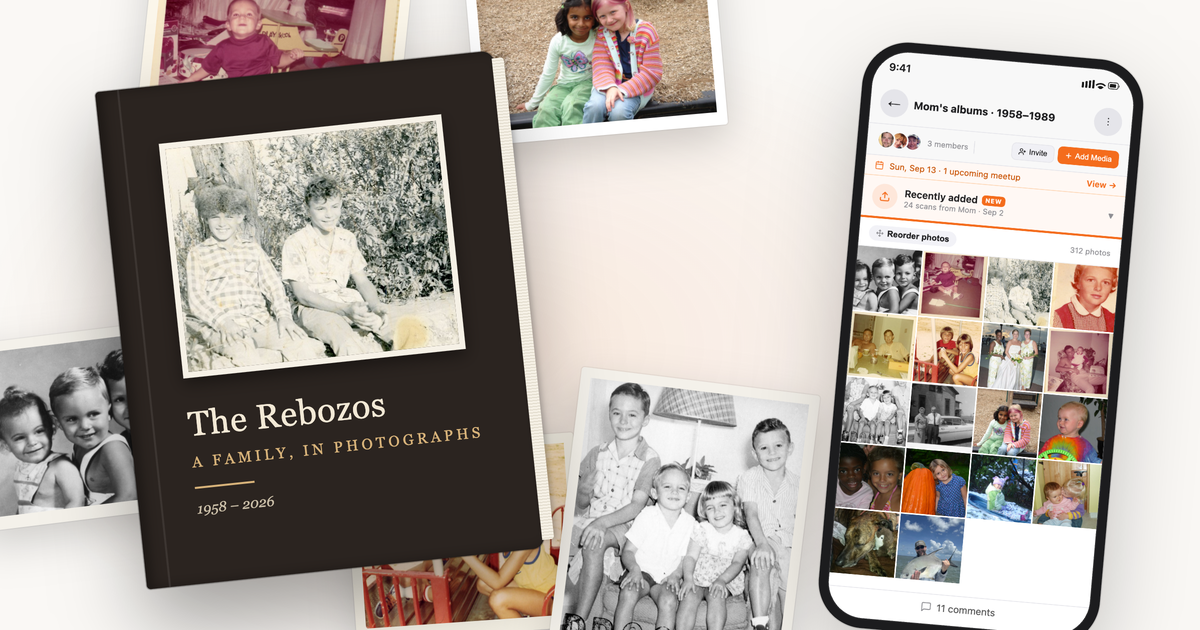
Then do the thing the box never let you do: get the family looking at them. That's what Memrico is for. Upload the scans into a family space, and Rico, your family's AI, recognizes the same faces across forty years of prints so "every photo of Dad" is one search instead of an afternoon. Everyone you invite can add the copies from their own drawer, leave a comment or a voice note under the one that starts an argument, and — this is the good part — sit down together on a video call and browse the album live, with the person who actually remembers doing the narrating. A scanned box is a backup. A shared one is a conversation.
If you had a legacy book made, this is where the rest of the collection lives: the thousand photos that didn't make the book, kept together and searchable, with the stories attached.
Frequently asked questions
How much does it cost to digitize 1,000 photos?
Roughly $250–$500 at a bulk mail-in service in 2026, depending on resolution and whether you fill a prepaid box. Premium hand-scanning runs about $700–$1,000 for the same count, and a full-service project that includes sorting, restoration, and a book is quoted individually and costs more.
Is 300 dpi or 600 dpi better for scanning photos?
300 dpi is enough to view and share on screens. Choose 600 dpi if you might reprint, enlarge, or crop. Slides and negatives are tiny originals and need 2,000–4,000 dpi.
Is it safe to mail original photos?
With an established company, yes — losses are rare, and the good ones barcode and track every batch. Reduce the risk further by sending in stages, including an inventory, and insuring the shipment. For a collection you couldn't replace, an in-home pickup service removes the mail from the equation.
Should I scan photos myself or use a service?
Do it yourself if the collection is small, you enjoy the project, or you want control over every scan — our guide to digitizing photos at home covers scanners and settings. Use a service for anything over a few hundred prints, for tapes and film, or when the originals are fragile.
What's the difference between digitizing photos and making a legacy book?
Digitizing turns prints into files. A legacy book uses those files — plus interviews, captions, and design — to tell the story behind them. Most companies do only the first. A few, like Your Legacy Your Story, do both.
Keep exploring
- How to Digitize Photos at Home: Best DPI, Scanners, and Storage — the DIY route.
- How to Create a Shared Family Album Everyone Can Add To — what to do with the scans.
- The Best Photo Sharing Apps for Families in 2026 — where the archive should live.
- What Is a GEDCOM File? — if the project turns into family history.
Got a box of scans and a family who'd love to see them? Join the Memrico beta and put the photos and the people who remember them in the same room.