The Best Photo Sharing Apps for Families in 2026: An Honest Comparison

Bill Rebozo
Updated August 2026
The best photo sharing app for your family depends on what "sharing" means to you. If you just need backup with light sharing, Google Photos is still the most capable free option. If everyone in your family owns an Apple device, iCloud Shared Photo Library is the smoothest. If you're a Prime household, Amazon Photos is a solid perk. If you want to share a baby's photos with relatives, FamilyAlbum is purpose-built for it. And if you want one private place where the whole family — every device, every generation — collects photos, adds their own, and actually looks at them together, that's the gap Memrico was built to fill.
Below is the full comparison, the criteria we used, and an honest "best for" verdict for each app — including where Memrico is not the right choice.
What should a family photo sharing app actually do?
A family photo sharing app should let everyone contribute photos from any device, control who can see and who can delete, and make the collection easy to revisit together — not just store it. Storage is a solved problem; the unsolved problems are participation and permissions. The average family adds about 3,600 new photos each year (EverPresent), and according to Popsa's 2026 Memory Economy report (a Censuswide survey of 8,000 people), 70% of photos are buried and never revisited. So the real test isn't "can it hold the photos" — it's "does the family ever open it again."
Five criteria matter most for families:
- Cross-platform: real families mix iPhone and Android. 91% of US adults own a smartphone (Pew Research) — and they didn't coordinate on the brand.
- Who can add: pooling photos from everyone is the whole point of a family album — here's how to set one up that everyone actually adds to.
- Who can delete: most consumer apps give everyone equal power — including the power to delete.
- Revisiting together: does the app give you a reason to open the album after the trip ends?
- Business model: free apps are paid for somehow. Know how.
How do the top family photo apps compare in 2026?
| App | Cross-platform | Everyone can add | Delete protection | Built for revisiting together | Cost model |
|---|---|---|---|---|---|
| Google Photos | Yes | Yes (shared albums) | No — collaborators have equal power | No (auto "memories" for you only) | Free to 15 GB, then subscription |
| iCloud Shared Photo Library | Apple only | Yes (up to 6 people) | No — every member can edit and delete | No | Included with iCloud storage plans |
| Amazon Photos | Yes | Family Vault (up to 5 invitees) | Partial — Vault contributors manage their own uploads | No | Prime perk |
| FamilyAlbum | Yes | Parents add; relatives mostly view | Yes — parents control the album | Partial (comments, monthly recaps) | Subscription — the full-featured plan is $109/year (basic app free) |
| Memrico | Yes — any device, same full experience | Yes — everyone you invite | Yes — family roles + recoverable Trash | Yes — live photo meetups, comments in text, voice, and video | Paid, not ad-supported (in beta) |
What is Google Photos best at?
Google Photos is the best free backup-and-search tool a family can get: automatic upload from any phone, excellent search, and shared albums anyone can join from iPhone or Android. Google built shared albums in 2015 and partner sharing in 2017 because pooling family photos is a real, proven need — the service was handling over 1.2 billion photos a day within two years (Google).
The family catch: a shared album is flat. Everyone you invite gets the same powers — per Google's own documentation, there's no way to let Grandma view without also letting her (or a curious grandchild with her phone) remove things, and no roles for who organizes versus who just enjoys. It's built as one person's library with guests, not a family's shared home.
Choose Google Photos if: you mainly want backup and search for your own library, with occasional shared albums.
What is iCloud Shared Photo Library best at?
For an all-Apple family, iCloud Shared Photo Library is wonderfully invisible: up to six people share one library, and photos can flow in automatically. Apple's own documentation is clear about the trade-off: everyone in the shared library has equal permissions to add, edit, and delete the shared photos. Six seats also means it stops at the household — cousins, grandparents, and the family historian aunt don't fit.
The bigger issue is the wall itself. iCloud shares easily with iCloud. Google with Google. Your family uses both — and someone's always locked out.
Choose iCloud if: every single person you share with is on Apple devices, and six people is enough.
What is Amazon Photos best at?
If you already pay for Prime, Amazon Photos gives you full-resolution photo backup at no extra cost, plus a Family Vault you can invite up to five people into. It's a genuinely good storage perk. As a family tool it's thin: the Vault is a shared pool, not a shared project — there are no family roles, no conversation around the photos, and little reason to open it except to retrieve something.
Choose Amazon Photos if: you're a Prime household that wants free full-res backup.
What is FamilyAlbum best at?
FamilyAlbum deserves real credit: it's private, cross-platform, and built around one job — parents sharing a child's photos with relatives, organized by the child's age, with comments from the grandparents. For that job it's excellent, and it's the closest competitor in spirit to a private family space.
Know the real cost going in: the basic app is free, but the full experience is a subscription — and the plan feature-comparable to a full family space, Premium Family Pro, runs $109 a year (or $10.99 a month). That's a fair price for what it does; just make sure you're comparing it as a paid product, not a free one.
Its limits show at the edges of its job: it's structured around the flow from parents outward to relatives, around one child's timeline. The 40-year-old shoebox scans, the reunion where twelve relatives all took photos, the family history side — that's outside its shape.
Choose FamilyAlbum if: your main goal is sharing a young child's day-to-day photos with far-away relatives.
Where does Memrico fit?
Memrico starts from a different question: not "where do the photos go?" but "when does the family actually look at them together?" It's an invite-only space for your family — no public feed, no algorithm — where everyone contributes from any device and the whole collection stays organized in one place.
Three things set it apart:
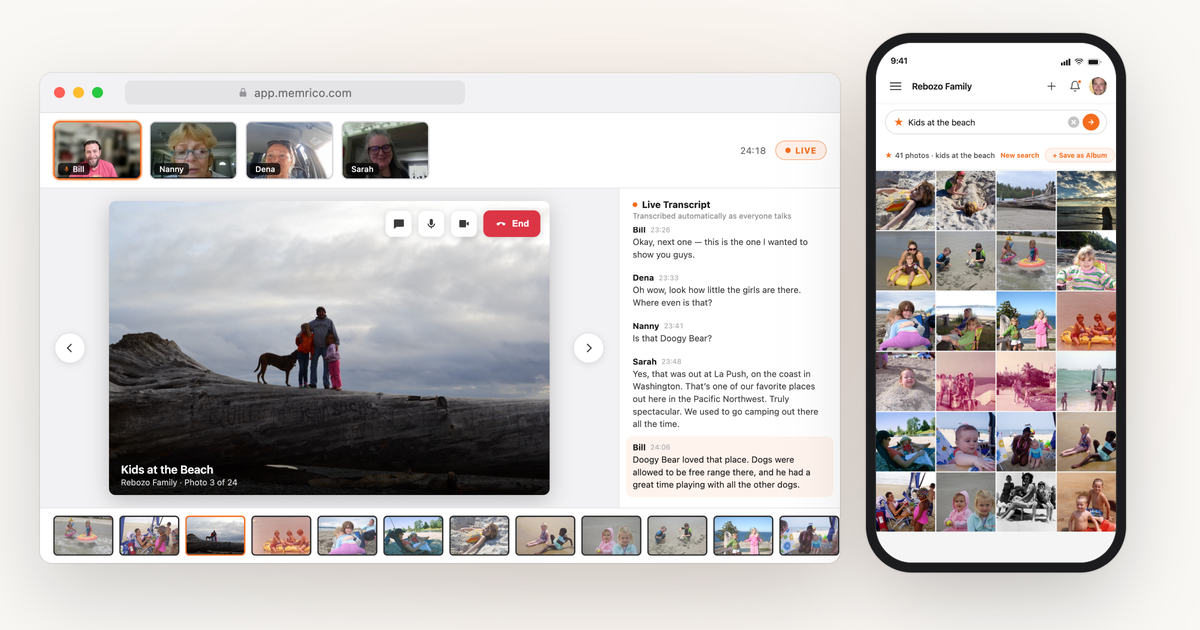
- Photo meetups — only on Memrico. The family gathers around the albums live: everyone sees the same photo at the same moment, anyone can flip the page, and the stories told along the way are kept with the photos. It's the difference between a storage locker and a Sunday afternoon.
- Roles that fit a family, not an office. Owner, Admin, Curator, Subscriber. Let a trusted relative organize, add far-flung cousins as viewers on just the reunion album, and keep the final say yourself. Deletes go to a recoverable Trash, so nobody accidentally nukes the album.
- Rico, your family's AI, does the heavy lifting. Rico organizes decades of photos in minutes, finds "kids at the beach" in under a second, and recognizes the same faces across 40+ years of pictures — so the answer to "70% of photos are buried and never revisited" is a space that actively brings the right memory back to the right people.
Honest caveats: Memrico is in beta, and it's a paid product — that's deliberate (your memories are the point, not the product), but it means it isn't the choice if free backup is all you're after.
Choose Memrico if: you want one private, cross-platform home for the whole family's photos — added to by everyone, protected by real roles, and actually revisited together.
Which photo sharing app is right for your family?
- Solo library, light sharing: Google Photos
- All-Apple household of six or fewer: iCloud Shared Photo Library
- Prime household wanting free backup: Amazon Photos
- New parents sharing with grandparents: FamilyAlbum or Memrico
- Whole extended family, every era of photos, on mixed devices: Memrico
Keep exploring
- How to share photos with family without social media — the five real options, compared honestly.
- How to share photos with grandparents (on any device) — and how to make it two-way.
- How to create a shared family album everyone can add to — setup steps plus the participation playbook.
Frequently asked questions
What is the best free photo sharing app for families?
Google Photos is the most capable free option: cross-platform shared albums, strong search, and 15 GB of free storage. The trade-offs are flat permissions (every collaborator can delete) and a business model where the service is free because your attention and data have value to the company.
Can family members on iPhone and Android share one photo album?
Yes — Google Photos shared albums, Amazon Photos Family Vault, FamilyAlbum, and Memrico all work across both. iCloud Shared Photo Library is the one that requires everyone to be on Apple devices.
How do I stop someone from deleting photos in a shared album?
On Google Photos and iCloud Shared Photo Library, you mostly can't — collaborators have equal permissions, which is documented behavior on both platforms. The reliable fix is an app with per-person roles. On Memrico, viewers can enjoy an album without being able to delete from it, and anything deleted goes to a recoverable Trash.
What's different about how Memrico shares photos?
Memrico is invite-only and built for browsing together: live photo meetups where the whole family sees the same photo at once, and comments kept in text, voice, or video with the exact photo they're about. It's paid rather than ad-supported, and it's currently in beta.
Ready to give your family's photos one home? Sign up for the Memrico beta — or start with our guide to digitizing the shoebox photos first.