How to Share Photos with Grandparents (On Any Device)

Bill Rebozo
Updated August 2026
The easiest way to share photos with grandparents is to pick one place that works identically on whatever device they own, invite them once, and then make looking at photos a thing you do together — not another feed they check alone. Texting works for single moments; a shared album works if everyone's on the same platform; a private family app works everywhere. What matters more than the tool is the ritual around it. Here's the honest rundown.
Why is sharing photos with grandparents so hard?
It's rarely about ability — most grandparents have a phone in their pocket now. The real obstacles are structural. US phone usage splits roughly 60/40 between iPhone and Android (StatCounter), so almost every extended family spans both — and whichever ecosystem you pick, someone gets a worse version. Plenty of grandparents do their looking on a laptop or a tablet rather than a phone, too: desktops still carry more than half of US web traffic (StatCounter), so "there's an app for that" isn't enough — it has to work in a browser as well. Photos arrive scattered — a text here, an email there — with no single place to return to. And the volume is relentless: the average family adds about 3,600 new photos each year (EverPresent). No grandparent can keep up with that through a message thread.
Should you just text them the photos?
For today's soccer goal — yes, always. Texting is immediate and it says "I thought of you." But it's a moment, not a collection. The photo gets buried under the next hundred messages, and six months later nobody can find it. That's the general fate of family photos now: according to Popsa's 2026 Memory Economy report (a Censuswide survey of 8,000 people), 70% of photos are buried and never revisited. Keep texting — and give the photos a home, too.
What's the easiest photo app setup for a grandparent?
Whatever you choose, the setup that works looks the same:
- One app, not five. Pick a single home for family photos and stick to it. Every extra place is a place they'll lose.
- Works on their device, not yours. If Grandpa has an Android tablet and you're all-iPhone, iCloud's shared library can't include him — it's Apple-only. Choose something cross-platform: Google Photos shared albums, or a private family app like FamilyAlbum or Memrico. (Full breakdown in our comparison of family photo sharing apps.)
- You do the setup. Send the invite, then walk through the first open together on a call. Ten minutes of patience buys years of participation.
- Let them do more than look. The best moment isn't when Grandma sees the photo — it's when she replies "that's your mother's smile." Pick a place where her comment stays with the photo.
How do you make photo sharing two-way?
Here's what the "send photos to Grandma" framing misses: grandparents aren't just the audience — they're the ones who know who's in the old photos. The names, the years, the story behind the station wagon. A feed can't collect any of that.
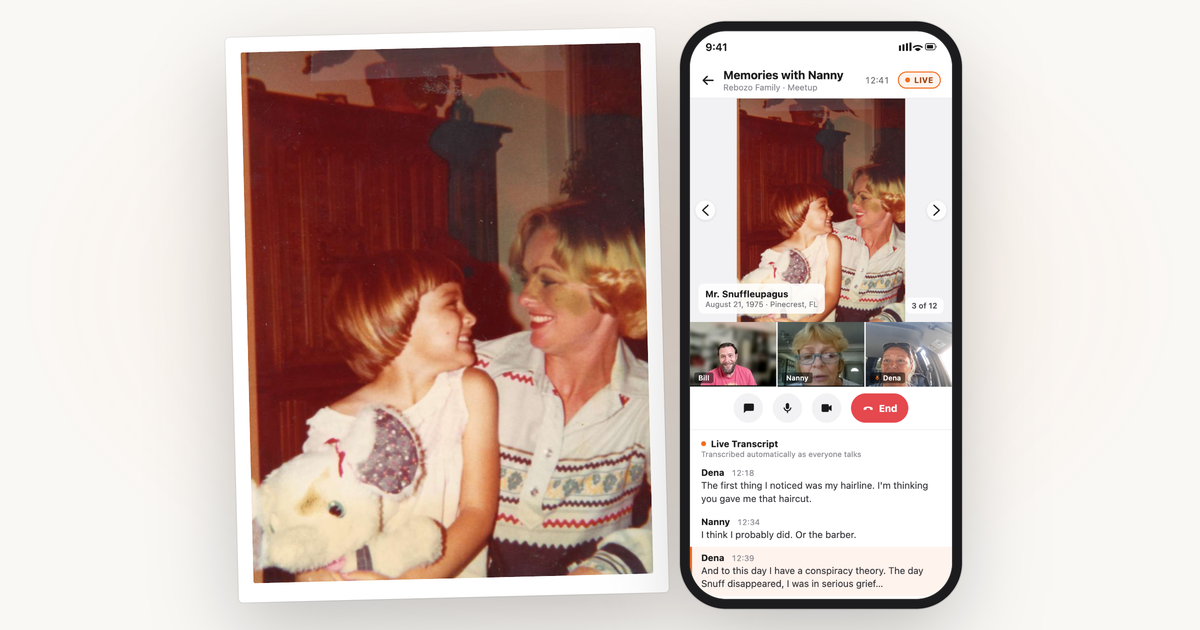
This is what Memrico's photo meetups are for. The family gathers around the albums live — everyone sees the same photo at the same moment, anyone can flip the page, and it works the same from any phone, tablet, or computer. Forty-five minutes of "THAT haircut?!" later, every story told along the way has been kept with the exact photo it belongs to, in the teller's own voice if they said it out loud. Sunday calls with a photo album in the middle turn out to be much better Sunday calls.
Five practical tips that make it stick
- Make it a ritual: a standing Sunday browse beats a firehose of uploads.
- Ask them for photos, specifically: "can you add the pictures from the lake house years?" works; "feel free to add photos!" doesn't.
- Ask about one photo at a time: "who's the tall one next to Dad?" gets stories a general request never will.
- Keep prints in the loop: a printed book at the holidays, drawn from the shared collection, closes the circle for relatives who'll never love screens.
- Protect their contributions: use a place with real roles, so a mis-tap can't delete what they added. (On Memrico, deletes land in a recoverable Trash regardless.)
Frequently asked questions
What's the best photo sharing app for grandparents who aren't tech-savvy?
The one that's on their device already beats the one that's theoretically better. Beyond that: cross-platform, invite-only, and simple — Google Photos shared albums for a light-weight option; a private family app like Memrico when you want the whole extended family in one place with comments and shared browsing. Avoid anything that requires them to manage an ecosystem they don't live in.
Can grandparents see shared photos without a smartphone?
Usually yes — Google Photos and Memrico both work from a web browser on any computer or tablet, so a laptop or an iPad is plenty.
How do I get my parents to actually look at the photos I share?
Change the unit from "photos" to "time." A ten-minute live browse together — a Memrico meetup, or even a screen-share call — reliably beats a hundred notifications. People skip feeds; they don't skip each other.
How do we collect the stories, not just the photos?
Ask specific questions about specific photos, and keep the answers where the photo lives. Memrico keeps comments in text, voice, or video attached to the exact photo — and if your family does genealogy, our GEDCOM guide covers connecting photos to the family tree.
The photos are still here. The people who remember are still here. Now's the moment to start. Sign up for the Memrico beta.