What to Do With Boxes of Old Family Photos You Inherited

Bill Rebozo
Published September 2026
I didn't start out with many photos. I didn't take a lot of pictures growing up. My own collection stayed small until my kids came along and it started to grow the way everyone's does. Then my mother asked me to help her digitize her photos, and I opened her boxes and found out how many pictures she'd taken of me as a kid that I had never seen. When we went through my father's things, there was a whole box of photos I didn't know existed. And over the years, as other relatives' photos needed a home, they kept coming to me, because I was known as the one who was going to do something with them eventually. If that sounds familiar, you're the family's photo keeper now too. This is what I've learned about what to do with the boxes, in the order I'd do it again.
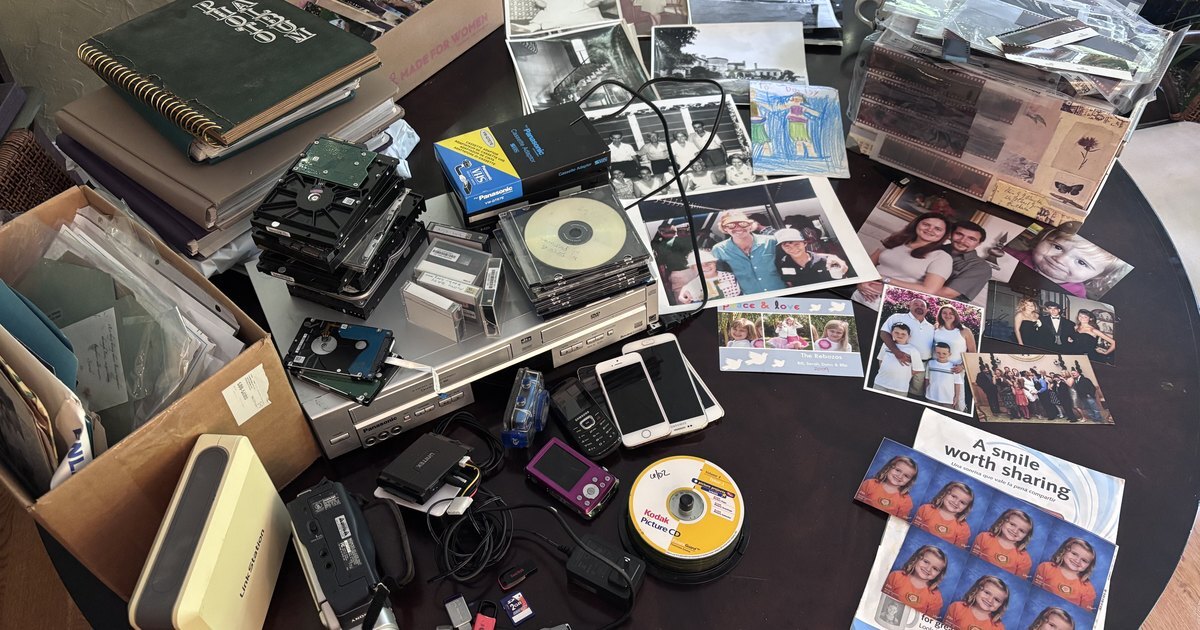
That's my dining table in the photo at the top of this post, and every piece of it is mine to deal with. It's a small sample, not the whole collection. On one side, the part everyone expects: albums with spiral bindings and sticky pages, a shoebox of prints, black-and-white photos, sleeves of negatives, a crayon drawing, an uncut sheet of my kids' school portraits, one of our own family holiday cards. On the other side, the part nobody pictures: a stack of bare hard drives, CDs in cases and on spindles, camcorder tapes and the adapter to play them, a VHS and DVD player, a camcorder, a point-and-shoot, old phones, a network drive, and a handful of USB sticks and memory cards. Every era of family photos, on one table. And in the middle of it, the color print of my sister and me with Jimmy Buffett, a photo I hadn't seen in years and was very happy to find again. That's the other thing about a box like this: somewhere in it is a picture you forgot existed. If your inheritance looks anything like this, here's where I'd start.
What should you do first with a box of inherited photos?
Nothing drastic. Don't sort, don't throw anything out, and don't start scanning yet. The first job is to keep what you have exactly as it is, because the way a box was packed is information: which photos were kept together, what order the album is in, whose handwriting is on the envelope. Put the box somewhere cool and dry in the main part of the house, not the attic, basement, or garage. Then take ten minutes and write down what you know while it's fresh: whose box it was, where it came from, who else in the family might have photos from the same years.
If there's more than one box, label each one with its source before anything gets mixed. "Dad's closet," "Aunt Carol's albums," "the envelope from Grandma's desk." Months from now, when you're trying to work out whose side of the family a stranger in a photo belongs to, that label will be the best clue you have.
Should you throw any of the photos away?
Not yet. The rule I learned the hard way while organizing decades of family photos applies twice over to inherited ones: consolidate first, curate later. You can't judge what's worth keeping in a collection you haven't seen, and inherited photos are full of things that look like clutter until someone recognizes them. A blurry picture of a house is nothing until your aunt tells you it's the house your grandfather built.
The same goes for duplicates. If your cousin inherited prints of the same wedding, those aren't a problem; they're a second copy and maybe a better one, sometimes with a name written on the back that yours doesn't have. The only things I'd set aside early are the obvious non-photos: blank prints, empty negative sleeves, and the fourteen pictures of scenery from a trip nobody remembers. Even those can wait until the rest of the family has seen them.
How do you find out who's in old family photos?
Ask the people who were there, and ask soon. This is the step that turns a box of strangers into a family again, and it's also the most enjoyable part of the whole project. Take a stack of prints to the oldest relative you can, or sit with them on a video call, and just ask "who's this?" You'll get names, and you'll get stories you didn't know to ask for.
Most of the black-and-white photos on my table meant nothing to me until my uncle Fred went through them with me. He told me who everyone was, and as he did, he told me about them: who they were, not just what they were called. I came away knowing more about those people than I ever had. That's what a name on the back of a photo can't give you.
Most families never get to this step. In an AARP survey, 73% of grandparents said they would use technology to capture their stories, yet only 9% regularly record them today (AARP, 2025). The willingness is there. What's usually missing is someone who shows up with the photos. That's you now.
For the ones nobody can place, check the backs for names, dates, and the photo lab stamp, and compare faces against photos you already know — our guide to identifying people, dates, and places in old photos covers the whole detective kit, from dating the print to the genealogy archives built for mystery photos. If your family has done genealogy work, a family tree from Ancestry, FamilySearch, or another tool can help you match names to the right generation (here's how to export yours). The photos are still here. The people who remember them are still here. That's the moment to start.
Should you digitize inherited photos yourself or send them out?
Either works, and most keepers end up doing some of both. Scanning at home is cheaper and lets you handle the fragile ones yourself; our guide to digitizing photos at home covers scanners and settings. Mail-in services are faster for a big collection and handle slides, negatives, and tapes that most home setups can't; we compared the major digitization companies and their 2026 prices.
And expect more than prints. Look at my table again: almost half of it isn't paper. Inherited boxes come with drives, discs, tapes, and phones, and each one needs its own reader before a single photo comes off it. I cover pulling photos off those in the era-by-era organizing guide; if there are tapes, a service that handles video is worth the money.
Whichever you choose, scan the photos in this order:
- The one-of-a-kind photos. Anything with no negative and no other copy in the family, and anything with writing on the back. Scan the backs too.
- Albums, as albums. Keep the page order so the story the original owner told still reads in sequence.
- Everything else, in batches by source box, so you always know where a scan came from.
Keep the originals after you scan them. A scan is a copy, and the print is still the one your grandmother held.
Should you digitize your kids' art and handwritten cards too?
Yes, and it turned out to be one of my favorite parts of the whole project. Some of what's on my table isn't inherited at all. It's ours: our holiday cards, my kids' school portraits, and a stack of handwritten cards my kids made for us over the years. The cards digitize beautifully. The handwriting, the drawings, the spelling, all of it looks wonderful on a screen.
Their art was the bigger surprise. Once a piece was scanned, I could finally clear the space without the guilty feeling of throwing away something my child made, because the art itself wasn't going anywhere. And my kids love seeing it now. Their old drawings are genuinely interesting to them, and they can pull them up on their own phones in Memrico instead of waiting for me to dig out a box. Someday this part of the table will be someone else's inheritance, and it's nice to know it'll be easy to find.
Is digitizing inherited photos enough?
No, and this is the thing it took me longest to understand. Digitizing is safekeeping, and safekeeping is only part of the job. Once my parents' photos were scanned, they sat on a drive, and a drive full of photos nobody looks at isn't much better than a box nobody opens. The responsibility I actually felt as the keeper wasn't to store them. It was to make sure they got enjoyed, and weren't forgotten.
The research lines up with that. Sharing memories with friends or family is the #1 reason people revisit their photos, at 34% (Popsa, The Memory Economy, 2026), and nearly 8 in 10 Americans say viewing old photos brings them happiness and calm (Fujifilm, 2025). The story matters as much as the picture: in a 2014 Shutterfly survey, 90% agreed that revisiting and sharing the story behind a photo makes it more meaningful (Shutterfly). And research on reminiscing shows that looking back together measurably strengthens feelings of closeness. The value of an inherited box isn't in owning it. It's in the family looking through it together. We wrote more about that in why you never look at your photos, and how to fix it.
How do you share inherited photos with the rest of the family?
Put them in one place the whole family can get into, from whatever phone or computer each person owns, and invite everyone to add what they have. Not a folder you email around, and not a drive only you can open. A shared place turns the keeper's job from "hold everything" into "start the collection," and the rest of the family fills it in.
I spent a long time looking for something that did that and didn't find it. Plenty of places could store the scans. None of them made it easy for my relatives on different phones to see them, add their own, and tell me who was in them. So I built Memrico. Every photo from every box goes into one family space. Relatives add what's in their own closets. Rico, your family's AI, recognizes the same face across decades of prints and phone photos, so "every picture of my father" becomes one search. Anyone can comment on a photo in text or in their own voice, and you can browse an album together on a video call, with the person who remembers doing the narrating, and keep the recording. The box I didn't know existed is now something my whole family goes through.
If you're getting started, our guides to creating a shared family album everyone can add to and sharing photos with grandparents on any device cover the details.
What if more than one person inherited the photos?
Share the photos, not the prints. Siblings splitting a parent's photos often divide the boxes, and then each of them has a third of the story. Scan once, put everything in one shared place, and let everyone see all of it. Who keeps which physical albums matters much less once everyone can see every page. If a sibling already took a box home, ask them to add their scans to the same place rather than sending them to you. The collection gets more complete every time someone does.
Frequently asked questions
Should I keep old photos after scanning them?
Yes, keep the originals. A scan is a copy, and prints carry things a scan can lose: handwriting, the album's order, the photo lab's date stamp. Keep them together, labeled by source, somewhere cool and dry.
How should I store inherited photos?
In the main part of the house, not the attic, basement, or garage, where heat and humidity swing. Use acid-free boxes or archival sleeves, keep them off the floor, and don't write on the backs with ballpoint or marker. Keep albums intact unless the pages are actively damaging the photos.
What do I do with photos of people I don't recognize?
Keep them and ask around. Share them with older relatives, check the backs for names and lab stamps, and compare faces with photos you can already identify. Someone in the family often recognizes a face years later, once the photo is somewhere they can see it. And if nobody can help, our photo identification guide walks through dating the print, reading the back, and the genealogy archives built for mystery photos.
What should I digitize first?
The one-of-a-kind photos: anything without a negative or another copy in the family, and anything with writing on the back. Then albums in page order, then the rest in batches by source box.
How do I split inherited photos between siblings?
Split the prints however you like, but share the scans. Digitize the whole collection once, put it in one shared place, and give everyone access, so no one ends up with only part of the family's story.
Keep exploring
- How to Organize Decades of Family Photos (Without Quitting Halfway): the whole collection, one era at a time.
- How to Identify People, Dates, and Places in Old Photos: the detective work, step by step.
- Best Photo Digitization Companies in 2026: when the box is too big to scan yourself.
- How to Digitize Photos at Home: Best DPI, Scanners, and Storage: when you'd rather scan them yourself.
- Why You Never Look at Your Photos (and How to Fix It): what happens after the scanning.
Inherited the family photos? Join the Memrico beta and give them a place the whole family can enjoy.