Why You Never Look at Your Photos (and How to Fix It)

Bill Rebozo
Published September 2026
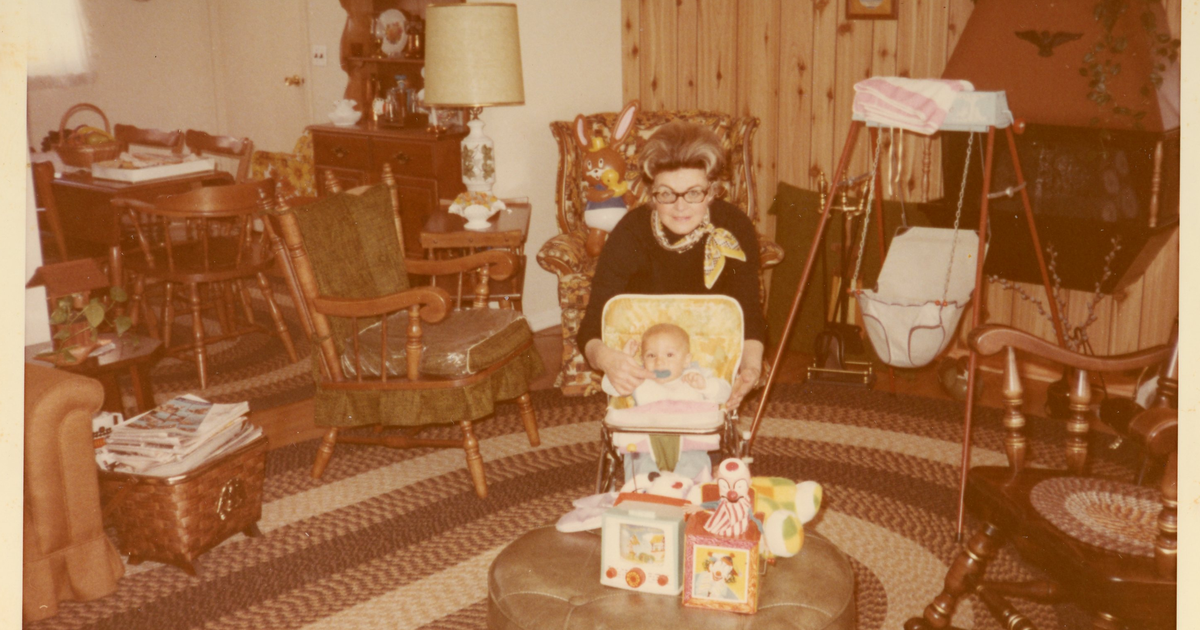
I was thinking of my grandmother recently and wanted a photo of her. Not any photo — the one at the top of this post, one of the first pictures ever taken of the two of us, in the living room of our old house: Grandma Janet in her glasses and her big hair, leaning over me in my walker, blocks stacked on the ottoman, the braided rug, the wood paneling. I knew I had it. I'd scanned it myself. Twenty minutes of scrolling later I gave up. That's the strange thing about family photos now: we take more of them than any generation in history, we keep every one of them, and then we never look at them again. This post is about why that happens, what actually pulls people back to their photos, and the handful of changes that fixed it for my family.
Why don't we look at our photos anymore?
Because there are too many of them, they aren't anywhere in particular, and nothing ever asks you to. Popsa's 2026 Memory Economy report, a survey of 8,000 people across four countries, found that 70% of photos are buried and never revisited. Not lost — buried. They're on the phone, in the cloud, in a folder called "New Folder (2)". They just never get opened. The average American's camera roll holds around 2,800 photos (Mixbook), and a camera roll is a pile, not a place. Nobody browses a pile.
Three things have to be true for a photo to get looked at, and for most photos none of them are:
- A way in. You have to be able to find it — by who's in it, when it was, where it was — faster than you lose interest.
- A reason. A birthday, a question from a kid, a cousin who says "remember this?" Photos don't get revisited on a schedule; they get revisited on an occasion.
- Somebody to look with. A photo you look at alone gets a glance. A photo you look at with the person who was there gets a story.
Storage solved none of those. It solved "don't lose them," which turned out to be a different problem.
Is it because there are too many photos?
Partly, but the number matters less than you'd think — what matters is how you look. In a study published in Personal and Ubiquitous Computing (Bergman, Gutman and Whittaker, 2022), participants trying to find a specific photo by hand in folders failed 43% of the time with a digital-camera-sized collection, and 71% of the time once the collection was smartphone-sized. When they used a timeline, search, and face recognition instead, the failure rate dropped to 29% — with the same photos. The pile didn't shrink; the way in got better.
That matches what I see in families. Almost half of Americans have 1,000-plus photos on their smartphone, and only a quarter regularly organize their digital spaces (Mixbook and YouGov, 2025). Telling those people to organize harder is not advice — I tried it, and I wrote up what I learned. The realistic fix isn't fewer photos or tidier folders. It's a place where "Grandma Janet and me at the old house" is a search, not a scroll.
What actually makes people go back to their photos?
Other people. In the same Popsa survey, sharing memories with friends or family was the number one reason people revisit their photos, at 34% — ahead of nostalgia, ahead of tidying up, ahead of everything else. And the payoff is real: 66% of Americans use photos to feel closer to loved ones, and 71% say sharing photos helps them stay in touch (Fujifilm, 2025). Nearly 8 in 10 say viewing old photos brings happiness and calm, and 84% say they're more likely to laugh and smile when they do. Research on reminiscing points the same way: looking back together measurably strengthens feelings of closeness.
So the question isn't "how do I make myself look at my photos?" It's "how do I make an occasion for other people to look at them with me?" A photo becomes worth revisiting the moment it has an audience. Back in 2014, a Shutterfly survey found 90% of people agreed that revisiting and sharing the story behind a photo makes it more meaningful — the story, not the pixels. The pixels were always there. What was missing was someone asking about them.
What's the difference between storing photos and reliving them?
A storage app's job is finished when the upload completes. A family's job is only starting. The big cloud services know this, which is why they added "Memories" and "On this day" features — automatic slideshows built from your library. They're pleasant, and they prove the appetite is there. But they work on one person's library and show it to that one person. The photo of your grandmother in the old living room can't surface for your sister if it's in your library, and it can't collect the story your mother knows about it if there's nowhere for her to tell it.
Reliving needs three things storage doesn't have: everyone's photos in one place, everyone able to find their way in, and somewhere the story can attach to the picture — a comment, a voice note, a recorded conversation. That's the design problem we set out to solve with Memrico, and it's the checklist I'd hold any app against.
How do you fix it?
Here's what changed it for my family, in the order that worked.
- Put everything in one place. Prints, the memory cards in the drawer, everyone's phones. Not one person's library — the family's. The era-by-era guide is how I did it without quitting halfway.
- Make finding effortless. The way in has to be who, when, and where. In Memrico, faces are recognized as photos arrive, dates and places come from the files, and you ask in plain words — "Grandma Janet and me, before I could walk" — and Rico, your family's AI, brings it back in a second. That's the difference between a search and a scroll, and it's the whole reason the Bergman study's numbers flip.
- Give the photos an audience. A shared space where every relative can add their own copies and see everyone else's. Here's how to set up an album everyone can add to — and why it works better than a group text.
- Let the story attach to the picture. Comments in text, voice, or video, on the photo itself. My mother won't type a paragraph, but she'll press a button and talk for forty seconds, and that forty seconds is now the most valuable thing about the photo.
- Make an occasion. Pick an album, invite the people who were there, and look through it together on a video call — Memrico records the conversation and keeps each clip with the photo that was on screen. The first time we did this with my grandmother's album, we got forty-five minutes of "THAT haircut?!" and three stories none of us had heard. Here's how to do it with grandparents on whatever device they have.
The last piece, and the one I care about most, is a helper that brings a photo back to you without being asked — the right picture, to the right people, when it's their anniversary or when a cousin just left a comment on it. That's the direction we're building in, because a family archive nobody visits is just a nicer shoebox.
The photo at the top of this post is the one I couldn't find. It's there now because "Grandma Janet and me" became a search instead of a scroll — and because once I found it, three people had something to say about that living room.
None of this requires a single spare Saturday of sorting. The photos are still here, and so are the people who remember them. Start with one album and one phone call.
| Why you never look | What fixes it |
|---|---|
| They're a pile, not a place | One family collection, every era, everyone's phones |
| Finding one takes longer than you'll spend | Search by who, when, and where — faces and dates handled for you |
| No occasion ever comes up | A shared album with new arrivals, a birthday, a meetup on the calendar |
| Nobody to look with | Comments in text, voice, and video; a recorded call on the album |
| The story isn't attached | Ask the person who knows, on the photo, while they can still tell it |
Frequently asked questions
Why do I never look at my old photos?
Because nothing prompts you to and finding a specific one is slow. Popsa's 2026 survey found 70% of photos are buried and never revisited, and the number one thing that brings people back is sharing with family. Give the photos an audience and a way in, and the looking takes care of itself.
Don't Google Photos and Apple Photos already resurface old photos?
They do, for one person: their "Memories" features build automatic slideshows from your own library and show them to you. What they can't do is pool the whole family's photos, let your sister find the one from your library, or collect your mother's story about it. Resurfacing for a family needs a shared collection first.
How do I find one photo among thousands?
Search by who, when, and where instead of scrolling. In a 2022 study, people looking for a photo by hand in folders failed 71% of the time with a smartphone-sized collection; with a timeline, search, and face recognition the failure rate was 29%. Any app that recognizes faces and reads dates from the files will get you most of the way there.
How often should a family look at old photos?
Whenever there's a reason — and the trick is to create reasons. A monthly album to add to, a birthday album, a video call on a trip's photos. Nearly 8 in 10 Americans say viewing old photos brings happiness and calm (Fujifilm, 2025), so the habit is worth building; it just won't build itself.
How do I get my family to look at old photos with me?
Show them something first. A shared album with fifty photos of them from thirty years ago is a better invitation than any request. Then make it an occasion — a call on a Sunday with the album on screen — rather than a link in a group chat. Here's how to share family photos without social media.
Keep exploring
- How to Organize Decades of Family Photos (Without Quitting Halfway) — getting everything into one place, era by era.
- What to Do With Boxes of Old Family Photos You Inherited — when the pile arrives all at once.
- How to Create a Shared Family Album Everyone Can Add To — the audience.
- How to Share Photos with Grandparents (On Any Device) — the occasion.
- The Best Photo Sharing Apps for Families in 2026 — how the options compare on revisiting together.
Ready to give your photos an audience? Join the Memrico beta and start with one album.