Folders vs Apps: The Best Way to Organize Digital Photos in 2026

Bill Rebozo
Published September 2026
My first serious attempt at organizing our photos was a folder tree. Year, then month, then a name for the event if I knew it — the classic. I still respect that system, and I'll defend it below, because the people who keep one are doing more than almost anyone else does: 48% of Americans have 1,000-plus photos on their smartphone, and only 25% regularly organize their digital spaces at all (Mixbook and YouGov, 2025). But my folder tree died the way most of them do, and what replaced it wasn't just an app — it was a different idea of what I was organizing. So here's the honest version of the folders-versus-apps question in 2026: what folders still do better, what apps do better, where both quietly fail a family, and a weekend plan that works whichever way you go.
Are folders still a good way to organize photos in 2026?
For one careful person with a modest collection, yes — folders remain a perfectly good system, and they have real advantages no app matches. The files are plainly yours: you can see them, copy them, move them to a new computer or a new drive in an afternoon, and nothing about the arrangement depends on a company staying in business or a subscription staying paid. A folder tree works offline, costs nothing beyond the storage, and never changes how it behaves because a product team redesigned something.
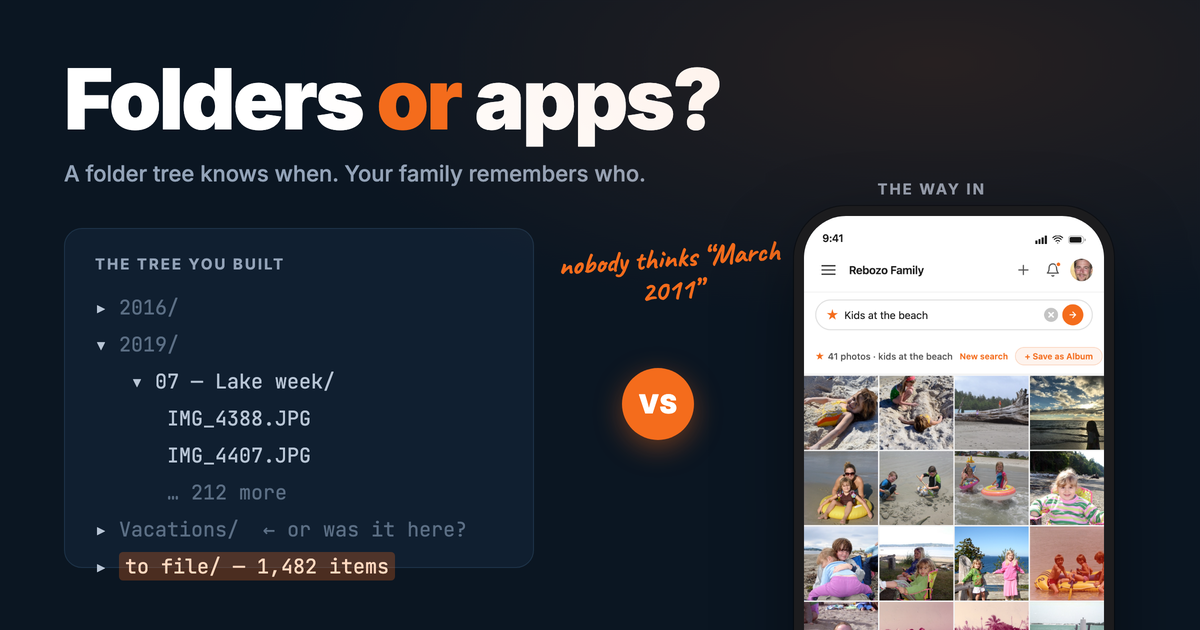
The standard structure still works: a folder per year, a folder per month inside it, and an event name on the folder when you know one ("2019/07 — Lake week"). It's simple enough that you'll actually keep it up, and coarse enough that filing a photo is a five-second decision. If your whole collection is a few hundred photos and you're the only one who needs to find things, you can stop reading here in good conscience — I said the same thing in the era-by-era organizing guide, and it's still true.
Where do folder systems fall apart?
Folders fail at scale, and family collections are always at scale. A folder tree can tell you when, because you filed by date — but it can't tell you who or where, and who and where are how people actually remember photos. Nobody thinks "March 2011"; they think "Mom, at the lake, when the kids were little." In a study published in Personal and Ubiquitous Computing (Bergman, Gutman and Whittaker, 2022), participants trying to find a specific photo by hand in folders failed 71% of the time once the collection was smartphone-sized; with a timeline, search, and face recognition, the failure rate fell to 29% — same photos, better way in (study).
Three quieter problems follow:
- It's one person's system. The logic of the tree lives in the head of whoever built it. Your spouse doesn't know whether the beach trip is under "2016" or "Vacations," and your kids will never look. A filing system nobody else can use is a private archive, however tidy.
- It stops when its keeper stops. A folder tree is maintained by hand, so it's only ever as current as your last free evening. Miss six months and the "to file" folder becomes the collection.
- Phones don't feed it. Photos are born on phones now, and no phone naturally delivers them into a folder tree on a computer. Every camera-roll photo needs a manual trip — cable, import, file — which is exactly the chore that killed my tree. The drives themselves need tending too: in a 10-country survey for Western Digital, 78% rely on free cloud storage, 60% ran out of space in the past six months, and 63% have already experienced data loss (Western Digital, 2025).
Are photo apps better than folders?
At the mechanics of organizing, yes, dramatically — and it isn't close. Google Photos and Apple Photos read the date, time, and place from every photo automatically, group the same face across years, and answer plain searches like "beach 2019" in a second. They're phone-native, so the photos file themselves the moment they're taken; the maintenance that killed the folder tree simply doesn't exist. The Bergman numbers above are the folders-versus-apps question answered in one line: the way in gets better, and finding goes from usually failing to usually working.
If the choice were only about effort and search, the apps would win outright. The catch is what they're organizing for.
What's the catch with photo apps?
Each app organizes one account's library for one account's owner. The faces your phone has learned, the albums you've built, the searches that work — all of it lives in your account, and none of it transfers to your sister's. Shared albums help, but they're a side room, not the house: each person's collection stays their own, and the organizing doesn't travel with a shared photo. And families never sit inside one company's walls anyway — US phone usage splits roughly 60/40 between iPhone and Android (StatCounter, web-traffic share), so the odds are your family spans both. iCloud shares easily with iCloud. Google with Google. Your family uses both — and someone's always locked out.
Two more honest costs. Moving out is hard: you can export your photos from any of the big apps, but the organizing — the recognized faces, most album structure — largely doesn't come with, so years of the app's work stays behind. And the free tier is a starting price: photos pile up until the storage cap arrives, and then every adult in the family is paying separately for their own copy of the same memories. In one February 2026 survey of 1,000 US adults by All About Cookies, 93% store photos and videos in the cloud, and people juggle nearly 3 cloud services on average (2.67) (source). That's not one family archive; that's a dozen partial ones with a dozen bills.
What are you actually organizing — your photos or your family's?
This is the question the folders-versus-apps debate skips, and it's the one that matters. A folder tree organizes one person's files. A photo app organizes one account's library. But the collection a family actually cares about was never one person's: your cousins have photos of you, your mother has photos of your kids, and the picture you're looking for was as likely taken by someone else's phone as by yours. Organize your own archive perfectly and you've organized a fraction of the family's — beautifully filed, and still mostly unseen. (Why photos go unlooked-at, and what brings people back to them, is a whole post of its own.)
That's the gap I built Memrico for. It's organized around a shared family space rather than a personal library: everyone adds photos from whatever phone or computer they own, into albums the whole family can open. Rico, your family's AI, recognizes the same face across decades of scans and phone photos — with each uploader's consent — so "every picture of Mom" is one search across everyone's contributions, not just yours. You can ask about a photo in plain words, and the answers people give — a typed comment, a voice note, a video — stay attached to the picture, so the story travels with it. And when you want to look through an album together, you can do it on a video call with the person who remembers doing the narrating, and keep the recording. Roles fit a family rather than an office: you decide who organizes, who adds, and who can take a photo down.
Folders keep files. Apps keep libraries. The unit worth organizing is the family's collection, with the stories attached — that's the third answer, and it's a different kind of thing, not a better filing scheme. (For how Memrico compares with the big apps feature by feature, see our honest comparison of family photo-sharing apps.)
Folders vs apps vs Memrico: how do they compare?
| What matters | Folder tree (Finder/Explorer, a NAS) | Google Photos / Apple Photos | Memrico |
|---|---|---|---|
| Finding one photo fast | Only if you remember where you filed it | Search by face, place, and date — within your own library | Ask in plain words across the whole family's collection |
| Faces | None | Recognized, per account — your app doesn't know your sister's library | Recognized across everyone's photos, with each uploader's consent |
| The whole family adding | One person's system; others rarely can or do | Shared albums on the side; each library stays personal | The shared space is the collection — everyone adds from any device |
| The story behind the photo | A file name, if that | A caption field | Comments in text, voice, or video, kept on the photo |
| Ownership and portability | Complete — plain files on your own drive | Photos export; the organizing mostly doesn't come with | The collection belongs to the family, not to one person's account |
| Upkeep | All yours, by hand, forever | Automatic for your own phone | Automatic as photos arrive — faces, dates, and places handled |
| Cost | Free, plus the drives you buy | Free until the storage cap, then a monthly plan per person | In beta — signing up is free for now. |
What should you do this weekend?
Here's a plan that improves your collection no matter which system you land on — folders, an app, Memrico, or some of each.
- Pick the home first. One place the whole collection will live, chosen before you sort anything. This is the single decision that separates finished photo projects from abandoned ones — it's the spine of the era-by-era guide.
- Turn on automatic upload from your phone into that home, so the collection stops falling behind from today forward. If your home is a folder tree, schedule a monthly import instead — and put it on the calendar, because "when I get to it" is how the tree dies.
- Consolidate one stray source. One old memory card, one "New Folder (2)", one drawer phone. Copy everything off it into the home, unsorted, labeled with where it came from. Prints count too — send a batch out if scanning isn't your idea of a weekend, and if you've inherited boxes of them, start here instead.
- Don't curate yet. Duplicates, blurry shots, seventeen photos of the same cake — all later problems, and much easier once everything's in one place.
- Give it an audience. Share one small batch — fifty photos is plenty — with one relative who has photos you don't. Whatever tool you use, this is the step that keeps the project alive; here's how to set up an album everyone can add to.
The photos are still here. The people who remember them are still here. That's the moment to start.
Frequently asked questions
Should I organize my photos in folders or in an app?
For a small, personal collection, folders are fine and cost nothing. Once the collection is phone-sized or family-sized, an app wins: dates, places, and faces are handled automatically, and search replaces remembering where you filed things. If the goal is a collection the whole family adds to and looks at, choose a shared space rather than a personal library.
What's the best folder structure for photos?
Year, then month, with an event name when you know one — "2019/07 — Lake week." It's fast to file into and fast to browse by date. Resist deeper nesting and people-based folders; a photo of three people can't live in three folders, which is exactly the problem face recognition exists to solve.
Can I use folders and a photo app together?
Yes, and it's a sensible pairing: keep a plain folder copy as the archive you fully own, and use an app as the way in — the search, the faces, the sharing. The folder copy is also your insurance if you ever change apps, since exported photos travel better than exported organizing.
Is organizing photos in an app safe if the app shuts down or I stop paying?
Your photos are exportable from any of the major apps, so they aren't stuck — but the organizing usually is. Recognized faces and most album structure don't survive an export, so plan on keeping either a folder archive or the originals. And an app is not by itself a backup: keep at least one copy somewhere you control.
How does a family organize photos when everyone uses different apps?
Not by getting everyone onto the same phone — that never happens. Pick one shared place that works the same from an iPhone, an Android phone, or a computer, and have everyone add to it while keeping whatever personal app they like. A shared album everyone can add to is the simplest place to start.
Keep exploring
- How to Organize Decades of Family Photos (Without Quitting Halfway) — the whole method, era by era.
- Why You Never Look at Your Photos (and How to Fix It) — what organizing is ultimately for.
- What to Do With Boxes of Old Family Photos You Inherited — when the collection arrives in boxes.
- The Best Photo Sharing Apps for Families in 2026 — the app-by-app version of this comparison.
Ready to organize the family's collection, not just yours? Join the Memrico beta and start with one album.