How to Store Old Photos So They Last (Physical + Digital)

Bill Rebozo
Published October 2026
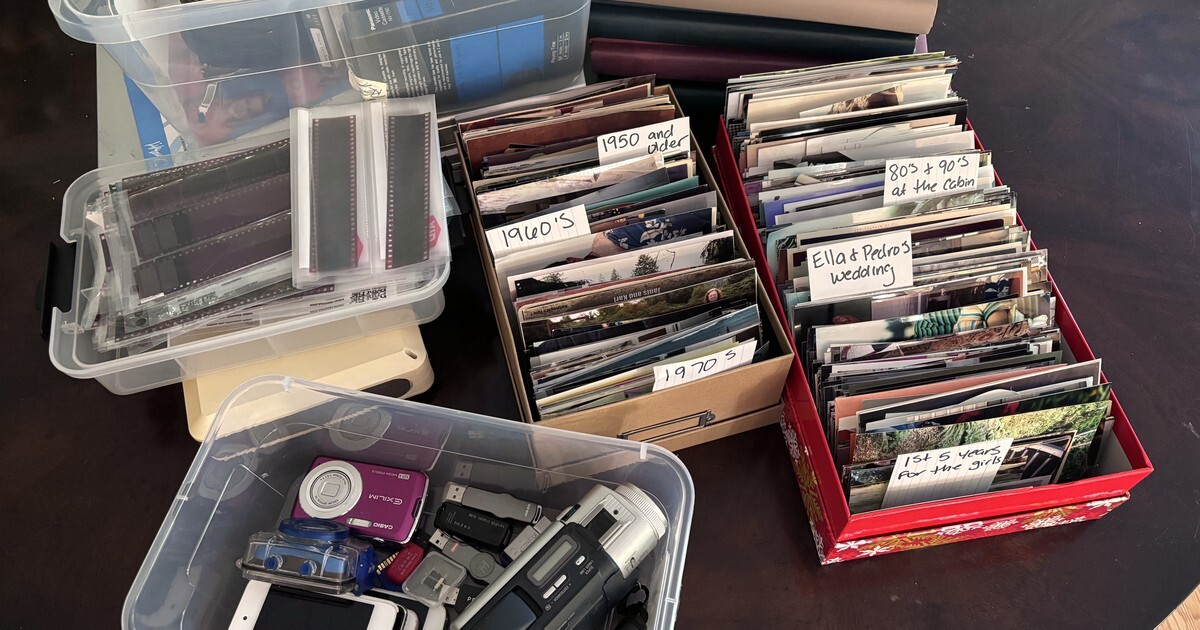
Every family I know stores its photos in the same three places: a box somewhere warm it shouldn't be, a drawer of devices nobody can plug in anymore, and a cloud account nobody's actually checked. Ours were no different — the shoebox at my mother's house, my own drawer of memory cards and discs, and tapes I needed a secondhand VHS player to even look at. So here's the practical version of "how do I store old photos so they last" — the physical half, the digital half, and the part most guides skip: lasting isn't the same as being seen.
Where should you keep printed photos?
Prints are tougher than people think, but they have three enemies: heat, humidity, and light. That rules out exactly the places most boxes live — the attic (heat swings), the basement (damp), and the garage (both, plus the occasional flood). The best storage in your house is boring: a closet shelf in the living space, where the temperature stays whatever you keep the thermostat at.
Beyond location, a few cheap upgrades matter:
- Acid-free boxes beat the original shoebox. Ordinary cardboard and paper slowly yellow whatever touches them. Archival photo boxes cost little and hold hundreds of prints.
- Get photos out of "magnetic" albums — the 1970s–80s kind with sticky pages and plastic film. The adhesive browns the prints and eventually won't let go. Peel them out gently (dental floss slid behind a photo works) and move them to sleeves or boxes.
- Write on the back in soft pencil, at the edge — never ballpoint or marker, which bleed through over the years. Better still, say who's in it once the photo is scanned, where the note can't damage anything. (And treat what's already written back there as treasure — handwriting, lab stamps, and studio imprints are exactly the clues our guide to identifying people, dates, and places in old photos reads.)
- Keep them flat and loosely packed. Rubber bands and tight bundles curl and crease prints; paper clips rust.
Plenty of families still hold real collections — 41% of Americans still keep physical photo albums (YouGov, 2022). If you've just inherited one of those collections, the inherited-boxes guide walks through triage before storage.
What about negatives, slides, tapes, and discs?
The same rules apply — cool, dry, dark — but with one honest difference: these formats are on a clock in a way prints aren't. A print in a decent box is readable in a hundred years. Magnetic tape isn't. The Library of Congress puts the practical lifespan of tape formats like VHS at roughly 10 to 30 years, and the players are disappearing faster than the tapes — I can tell you from experience that finding a working VHS deck is now a small quest. Yet 1 in 7 Americans still watches VHS tapes (Consumer Reports, 2024), which tells you how much family footage is still sitting on them. Burned DVDs and CDs from the 2000s age unevenly too — some are fine, some develop errors, and you can't tell from the outside.
The move for this shelf of media isn't better storage — it's digitization, sooner rather than later, and then storing the originals properly as the backstop. If the volume is small, scan at home; for a real backlog, the mail-in services handle prints, slides, and tapes in one shipment. Either way, the tapes come home — digitized, they're just files, and files you can keep everywhere.
Are your photos safe in the cloud?
Mostly yes — and almost nobody believes it, for a good reason. In EverPresent's survey of American families, 82% of families aren't confident all their photos and videos are on the cloud, and 83% worry about losing them (EverPresent). Notice what that fear actually is: not that the cloud will fail, but that not everything made it there. The camera roll that never finished uploading, the old phone that was traded in, the memory card in the drawer — the gaps are on our side, not the data center's.
So the honest answer: a major cloud service is very good at keeping what it has. The risks are the free tier quietly filling up and new photos silently not syncing, the account itself (one forgotten password, one lapsed email address — what happens to the account when someone dies is its own guide), and everything that never got uploaded in the first place.
The fix is an old photographer's rule, translated into household words: keep your photos in two places you control, one of them outside your house. In practice for a family: the working copy on a computer or external drive at home, and a cloud copy. Prints and tapes count as originals — store them well, but don't let them be the only copy of anything you'd grieve.
A simple setup that actually lasts
- Prints: acid-free boxes, living-space closet, labeled by era — a "1970s" box is a five-minute decision, as the era-by-era method says.
- The irreplaceable ones: scan first, store second. Anything that exists in exactly one copy gets digitized before it goes in the box.
- Tapes, slides, discs: digitize this year, not "someday" — the formats, not the memories, are what's aging out.
- Digital: one copy at home, one in the cloud, and once a year — pick a date you'll remember — check that both are still complete and still open.
The photos are still here. The people who remember are still here. Now's the moment to start.
Storage keeps photos. It doesn't keep memories.
Here's the part the storage guides never say: a perfectly preserved photo nobody ever looks at is doing almost nothing for your family. Boxes and backups are the floor, not the point. The point is the photo surfacing at the right moment — somebody asking "who's this?", your mother telling the story, the kids hearing it.
That's the job Memrico does — not a backup plan, but the place the family actually gathers around the photos. One private space, shared albums anyone in them can add to from any phone or computer, and every comment — typed, spoken, or on video — stays with the photo it belongs to. Ask Rico, your family's AI, for "the lake, when the kids were little," and the right picture comes back with its stories attached. Store the originals well, keep two digital copies, and then give the photos somewhere to be seen. The beta is open.
FAQ
Are photos safe in the cloud long-term?
The big services are reliable keepers of what they hold. The real risks are partial uploads (the most common gap), a full free tier that stops syncing, and losing access to the account itself. Treat the cloud as one of two copies, not the only one, and check it once a year.
What's the best way to store printed photos at home?
Acid-free boxes, on a closet shelf inside the living space — never the attic, basement, or garage. Loosely packed, flat, out of sticky "magnetic" albums, labeled in soft pencil at the edge if at all.
How long do VHS tapes and burned discs last?
Magnetic tape has a practical lifespan of roughly 10–30 years per Library of Congress preservation guidance, and burned discs from the 2000s age unpredictably. Both are digitize-this-year formats, not store-and-forget formats.
Should I keep the original prints after scanning?
Yes. Scans are for finding, sharing, and safekeeping; the originals are artifacts — and stored properly, they'll outlast most digital formats. Scanning just means the box is no longer the only copy.
Is a shared family space a backup?
No — and we'd rather say so plainly. Memrico is where the family sees, shares, and tells the stories of the photos. Keep your two copies (home + cloud) for safekeeping; bring the photos to the family space to be lived with.
Keep exploring
- What Happens to Your Photos When You Die? A Digital Legacy Guide
- How to Identify People, Dates, and Places in Old Photos
- How to Organize Decades of Family Photos (Without Quitting Halfway)
- What to Do With Boxes of Old Family Photos You Inherited
- Best Photo Digitization Companies in 2026
- Folders vs Apps: The Best Way to Organize Digital Photos in 2026